Page 5 of 6

Re: Pinocchio and Restorations

Posted: Thu Mar 19, 2009 3:59 pm
by Marky_198
Disney Duster wrote: Anyway, Marky, that candle and lighting thing, I wish that I, or somebody, could talk to someone about why this great looking lighting has been removed, or at least is less there in the restorations. In the screencaps I've seen, Pinocchio's recent restoration has actually retained some of the light, more so than the old restoration, just not as much as the laserdisc. But I really wish I could talk to a restorer or someone who would know about it at Disney to know why this great lighting is hardly there now.

As for the texture, removing the grain could have removed it, but also they try to take out all paint crawl, and some have noticed brush strokes are also removed. That's all in addition to them trying to smooth out the colors. Smoothing out the colors could make it look like flattening out the colors. So now it's solid blocks of color instead of, well, textures. I would like to talk to people at Disney about this, too.

It would be great if you could tell us about your books and scan the pages. If you can't, the only thing you might be able to do is try to make examples of the light sources, shadows, and textures, point them out to us, maybe by circling them or something. You could also try writing to Disney, I hear written, not E-mailed, letters work better. I might do that myself someday.

KubrickFan, we don't know if Marky was talking about the cel shadows in that other thread. But I did notice, in that comparison Flanger-Hanger gave, there is one string, the one closest to us, near Pinocchio's right arm, which I guess has a clear cel shadow in the picture from his book, but in the Blu-ray screencap, it's now more blurry and gray...! Why couldn't a high-def restoration make that better...?
Thanks Disney Duster! I wish I could talk to some experts about that too!
Unfortunately I don't have a scanning device.
And I wasn't talking about cell shadows in the other thread but I'll try to explain it in that thread.

Posted: Thu Mar 19, 2009 4:15 pm
by Marky_198
KubrickFan wrote:Restoring simply means bringing the current film back to it's original state. .
I see what you mean, but in my opinion it's "original state" is how the film was first released. So the product of all these factors we've mentioned (particular characteristics of film stock, colored lighting under the camera, the amount of glass and cels overlaid, production notes etc.)
All these factors determined the look of the film. So copies from that over the years, are still closer to the original product, then taking the cells and digitally start over again. Even if they gained a little bit more grain or colors were adjusted a little bit. Thanks to all those original factors it had a certain look that's different from the cells and blu-ray too, so that's not the point.
And I'm not familiar with the godfather restorations, but it's great if the look how they looked in the 70's. All we know for sure is that This new Pinocchio is not what it looked like in the 40's because the factors (particular characteristics of film stock, colored lighting under the camera, the amount of glass and cels overlaid, production notes etc) are just removed.

Posted: Fri Mar 20, 2009 2:10 am
by 2099net
Marky_198 wrote:
2099net wrote:
So if there is no clear frame of reference, particular characteristics of film stock, colored lighting under the camera, the amount of glass and cels overlaid, production notes etc. have to be taken into account.

Which basically says what I've always said. I believe the people doing the restoration try their best to get the colours as close as possible to the "original" - even though there is no "definitive" evidence that they can use.
But it also means that the "premiere print", the "first print", that was basically the film they made and released, is a product of all these factors (particular characteristics of film stock, colored lighting under the camera, the amount of glass and cels overlaid, production notes etc), and this look can never be achieved by digital restoring the original cells whatsoever.
The lighting, the look, the texture, everything will be different and IS different as we see in the recent restorations. So I would say that only copies of (or prints from) the original print would be accurate and as close to the original as you can get.
Yes, but it also means subsequent re-issues - especially later ones ON A TOTALLY DIFFERENT FILM STOCK (Eastmancolor) processed WITH A TOTALLY DIFFERENT PROCESS (Eastmancolor) don't look the same as well - so in the case of a film made in 1940 such as Pinocchio, I think we can safely assume NO home video release is the same as the original.

How do you make these mythical "copies" and "prints" from the original, Marky? They can't photoprocess them because most of the stock and chemicals no longer exist. Nitrate film was more or less banned because it spontaneously combusted!

Do you not think if they could do a copy as easily as you seem to think they can from the original/initial print they would? Do you think Disney is funding a time consuming restoration project just to piss you off?

Don't you understand? Why is it so difficult?

And the original film warps and goes out of shape with age too - you're fast on a road to nowhere if you rely on constantly striking copies off 1st or 2nd generation prints, because you'll regularly have to replace them.

The old methods of photoprocessing from three-strip negatives most likely doesn't even exist anymore. And it sure as hell wasn't used for any transfer made to any home video format.

Its not about matching exactly - its about people using judgement to match as closely as they can. Whenever anyone does a restoration, all that they can is their best, with the technology and techniques of the time.

Oh, and the original bit about the artwork looking different when published in guidebooks, is just as relevant to your references of Pinocchio in published books and magazines. More so I would say, as these older publications would rely on more "judgement calls" when it came to mixing inks for printing. If people couldn't match the colours from film print to film print, why do you think people using similar photochemical processes to make the printing plate used is publishing before digital publishing could?

Posted: Fri Mar 20, 2009 2:13 am
by 2099net
Marky_198 wrote:
KubrickFan wrote:Restoring simply means bringing the current film back to it's original state. .
I see what you mean, but in my opinion it's "original state" is how the film was first released. So the product of all these factors we've mentioned (particular characteristics of film stock, colored lighting under the camera, the amount of glass and cels overlaid, production notes etc.)
All these factors determined the look of the film. So copies from that over the years, are still closer to the original product, then taking the cells and digitally start over again.
They don't take the cels, they take the negatives. Haven't you been reading anything?
Even if they gained a little bit more grain or colors were adjusted a little bit. Thanks to all those original factors it had a certain look that's different from the cells and blu-ray too, so that's not the point.
And I'm not familiar with the godfather restorations, but it's great if the look how they looked in the 70's. All we know for sure is that This new Pinocchio is not what it looked like in the 40's because the factors (particular characteristics of film stock, colored lighting under the camera, the amount of glass and cels overlaid, production notes etc) are just removed.
No, I'm pretty sure transferring from dyed techincolor to Eastmancolor had a larger negative effect than any of these "digital" restorations.

Re: Pinocchio and Restorations

Posted: Fri Mar 20, 2009 2:39 am
by 2099net
Disney Duster wrote:It really would be extra expensive to pay people to, basically, digitally paint? We've know they digital re-paint, or paint-over, in restorations. We've seen it in Sleeping Beauty's previous DVD restoration feature, and evidenced by screencaps of Cinderella showing one thing being mistakenly colored one way originally, and re-colored to be more correct in the new restoration for the DVD.
But they were "fixing" errors, just like how they "fixed" the disappearing Raccoon in Bambi and the transparent Figaro in Pinocchio.

We can debate if that's right or wrong, but to suggest that they repaint the whole of each frame, frame by frame is just ridiculous. Because they fixed a disappearing raccoon in Bambi, it doesn't logically follow that every single frame's composition was altered does it?

And correct me if I'm wrong, but on the earlier Sleeping Beauty restoration wasn't one of the problems that colours fickered/pulsated due to the inadequency of the source they were using. It would be pretty hard to remove this pulsing without adjusting the colour - and indeed, it still did pulse - especially on the earlier released PAL DVD (as I commented here in 2003! Way before all this restoration fuss was taking over the forum).

Besides, I'll have to watch it again, but weren't they only "painting" bits from the same frame or previous/subsequent frames over damaged areas in that restoration featurette?

Not only was Sleeping Beauty's (previous) restoration done 10 or more years ago on less technology, but it also had its own unique problems. It's pretty hard, I'm sure you'll admit, to fix fluctuating colours without some form of recolouring/colour management. More importantly - Disney themselves knew it wasn't up to the standard required today and paid for an all-new restoration we see on the Platinum release today.

I think its clear the 1998-ish restoration wasn't a proper job. I doubt it was from the original negatives for example (due to the pulsing colours). I'm sure it was vastly superior to what they could have done from a photochemical restoration from a pulsating source, but at the same time, it wasn't a complete overhaul direct from the negatives. It was also the first (or one of the first) all digital restorations. You can't expect new techniques to hit the ground running.

Just follow the link below to see how digital restoration has improved since 1998. People wouldn't spent the time and effort developing these techniques and formulae unless there was a need. (Although not all are directly related to film restoration).
http://www.ima.umn.edu/2005-2006/W2.6-1 ... racts.html

Something else you have to remember is even the machines for scanning/playing old film/negatives have evolved over the past decade. Developments with wet gate scanning mean that the original is much less likely to be scratched or damaged.

I don't think this site is correct, but they claim to be the only wet gate scanning facility in North America.
http://www.ivchd.com/services.shtml
Digital Intermediate

Digital Intermediate Finishing 4K, 2K, or HD, Color Correction, Conforming, Titling
Dual Sync Dailies HD (4:4:4 or 4:2:2) and SD with Keykode and timecode.
Film Scanning (4K/2K/HD), including the only wet-gate film scanning in North America
35mm Film Recording, and 35mm printing.
If correct - or even semi-correct (they probably mean the only wet gate 2k+ scanning), but if that's the case, I doubt there were many - if any - wet gate scanners for lower resolution copies in 1998!

The previous restorations never/rarely used the original negatives or even the original positive print as the base of the restoration - the risk of damage would be much higher.

Thus the 1998 restoration of Sleeping Beauty probably had to be from a film print which was suffering from the beginnings of colour fading. And the restorers had to do the best they could with the source they had. That's why I get annoyed - people who work on these restorations are not miracle workers - they constantly do their best and each restoration takes months - not just physically but also in research and investigation.

Posted: Fri Mar 20, 2009 4:52 am
by Marky_198
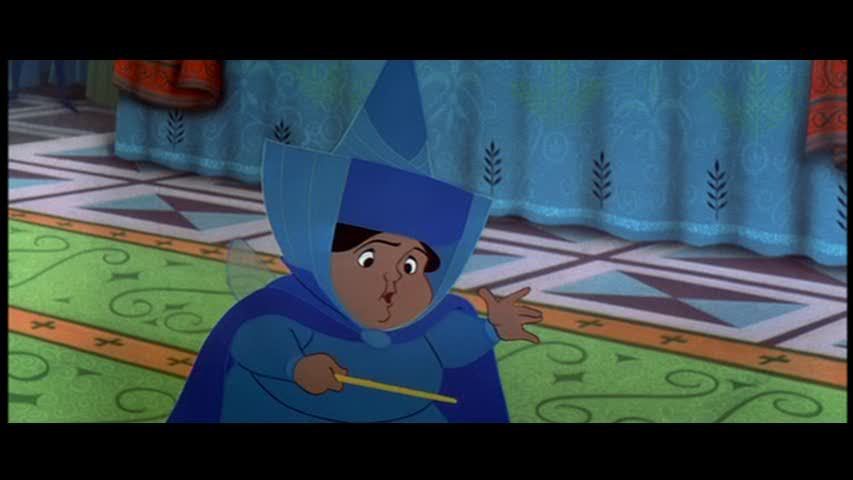
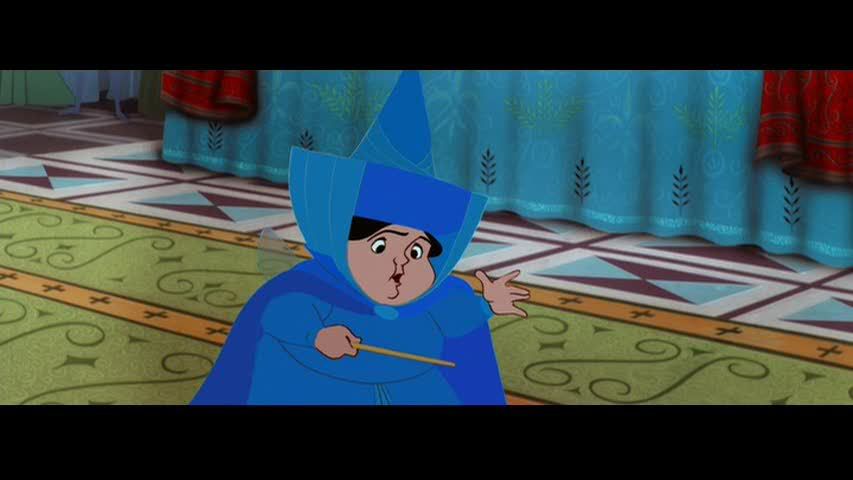
2099net, don't praise the new Sleeping Beauty restoration too much, because there are many flaws in it. The colors in general may be quite accurate, but clearly there is a strange "layer" over the image.
Many lines disappeared, like on Marryweather's sleeve.
And skins look like plastic/clay, instead of actual skin in the 2003 version.
Compare these screenshots. Everything is just whiped out, but the lines in the face are extremely thick. The patches are really flat and saturday morning-cartoonish.

http://www.hometheaterforum.com/htf/3447001-post66.html


And if you look here and scroll down, you see bigger/high resolution screencaps from the BD, with even more horrible results:

http://www.hometheaterforum.com/htf/sd- ... ion-3.html

Posted: Fri Mar 20, 2009 5:43 am
by KubrickFan
Marky_198 wrote:2099net, don't praise the new Sleeping Beauty restoration too much, because there are many flaws in it. The colors in general may be quite accurate, but clearly there is a strange "layer" over the image.
Many lines disappeared, like on Marryweather's sleeve.
And skins look like plastic/clay, instead of actual skin in the 2003 version.
Compare these screenshots. Everything is just whiped out, but the lines in the face are extremely thick. The patches are really flat and saturday morning-cartoonish.

http://www.hometheaterforum.com/htf/3447001-post66.html


And if you look here and scroll down, you see bigger/high resolution screencaps from the BD, with even more horrible results:

http://www.hometheaterforum.com/htf/sd- ... ion-3.html
They are exactly the same. Only the lines are easier to see in the new version. Plus, this is only one shot and screenshots are not to be trusted. I've seen many instances where the screenshots looked awful, and the film at home did look quite good.

Posted: Fri Mar 20, 2009 7:26 am
by Marky_198
KubrickFan wrote:
They are exactly the same. Only the lines are easier to see in the new version. Plus, this is only one shot and screenshots are not to be trusted. I've seen many instances where the screenshots looked awful, and the film at home did look quite good.
Excuse me? The same?
And that one is an exact screencap of the Blu ray.
This "layer", this disappeared and recolored lines, and this plasticky/cartoony looking skin is what happens with the restorations.
And look at the face and the sleeve for %#&@ sake.
How do you explain that many things and lines disappeared (like the sleeve) and other lines (like the face) are suddenly way too thick?

2003 dvd

<a href="http://s46.photobucket.com/albums/f112/ ... 800002.jpg" target="_blank"><img src="http://i46.photobucket.com/albums/f112/ ... 800002.jpg" border="0" alt="Photobucket"></a>

2008 dvd

<a href="http://s46.photobucket.com/albums/f112/ ... 800001.jpg" target="_blank"><img src="http://i46.photobucket.com/albums/f112/ ... 800001.jpg" border="0" alt="Photobucket"></a>

Blu ray

<a href="http://s46.photobucket.com/albums/f112/ ... ¤t=sb1.jpg" target="_blank"><img src="http://i46.photobucket.com/albums/f112/ ... SB/sb1.jpg" border="0" alt="Photobucket"></a>

Posted: Fri Mar 20, 2009 10:49 am
by ajmrowland
Screencaps can be subjective. Now I know that's not accurate, because it wasn't fit to be on a computer. It was fit to be on tv.

I quote this guy on the HTF:
I think it may have more to do with the fact that nearly every animated release has some horrible defect according to self proclaimed experts and hardcore fans. I fully expect them to bitch and moan about every release and I don't take anything they say seriously because they pull the fire alarm on everything. I bet I'm not the only one who writes them off because of that.

Posted: Fri Mar 20, 2009 10:52 am
by Marky_198
Nice try mate, but I have seen the Blu ray and dvd on big flatscreen, normal, and hd tv's and they look exactly like this.
And right now I have my 2008 dvd paused on my tv screen and it looks exactly like this. This is just how it looks. Accept it.

And about that quote, as long as he takes this horrific images seriously it's fine with me.

Posted: Fri Mar 20, 2009 10:57 am
by ajmrowland
Then it's just your obsession again.
Once again:
I think it may have more to do with the fact that nearly every animated release has some horrible defect according to self proclaimed experts and hardcore fans. I fully expect them to bitch and moan about every release and I don't take anything they say seriously because they pull the fire alarm on everything. I bet I'm not the only one who writes them off because of that.

Posted: Fri Mar 20, 2009 11:25 am
by Flanger-Hanger
That is one dreadful looking quality screenshot. I don't know what Joe Shmo on Photobucket too it but he or she needs new capping technology. Compare one of her shots:

Image

Image

http://s46.photobucket.com/albums/f112/ ... 800004.jpg

With Blu-ray.com:

Image

The Pohotbucket person's pics are incredibly pixely and are obviously of poor quality. That you would even think to use them to prove a point is laughable.

and Merryweather looks fabulous:

Image

Posted: Fri Mar 20, 2009 11:31 am
by KubrickFan
Marky_198 wrote: Excuse me? The same?
And that one is an exact screencap of the Blu ray.
This "layer", this disappeared and recolored lines, and this plasticky/cartoony looking skin is what happens with the restorations.
And look at the face and the sleeve for %#&@ sake.
How do you explain that many things and lines disappeared (like the sleeve) and other lines (like the face) are suddenly way too thick?
Still only one shot. The restorations are done by people with a limited amount of time and money. Of course there are going to be some things that could be done better. But is it worth the exorbitant amount of time and money it would take for every film? I think not.

Posted: Fri Mar 20, 2009 5:31 pm
by Marky_198
Ajmrowland, Flanger-Hanger and KubrickFan,

Considering your reactions I see you agree with me that the image looks unacceptable.
The Blu ray screencap is actually from very high quality, so don't hide behind that please.
And if you're still not convinced. Go watch your own dvd or Blu ray and have a look at this shot.

So yeah, washed out sleeves, re-colored face. Thick lines and flat, cartoony patches.
I would say the restoration process still has a long way to go, don't you think?

Posted: Fri Mar 20, 2009 5:38 pm
by ajmrowland
Uh, you sure your tv or computer doesn't have any dead pixels?

Seriously, my Blu-ray looks every bit like the "high-quality source" pics Flangy just posted.

Posted: Fri Mar 20, 2009 5:44 pm
by Marky_198
Good for you. Then can you explain why your blu-ray doesn't look like the even higher quality Blu ray screenshot I posted?

But if you want, take a look at YOUR Blu ray copy on YOUR tv screen and tell me what you think of the washed out sleeves, re-colored face. Thick lines and flat, cartoony patches.

Posted: Fri Mar 20, 2009 5:47 pm
by CampbellzSoup
becuase your picture is compressed...??

Posted: Fri Mar 20, 2009 5:50 pm
by Marky_198
CampbellzSoup wrote:becuase your picture is compressed...??
Can we get to the point please, take a look at YOUR Blu ray copy on YOUR tv screen and tell me what you think of the washed out sleeves, re-colored face. Thick lines and flat, cartoony patches.

Posted: Fri Mar 20, 2009 5:55 pm
by ajmrowland
Seriously, dude. You need help.

Posted: Fri Mar 20, 2009 6:04 pm
by Marky_198
No dude, I just care. And you don't.