Posted: Sat Mar 19, 2005 1:31 am
DVDizzy Forum
Disney, DVD, and Beyond Forums
https://dvdizzy.com/forum/
Is something wrong? Can't see the pictures on this website
Page 2 of 2
Posted: Sat Mar 19, 2005 1:41 am
OOPS!! Sorry didsn't see it
Posted: Sat Mar 19, 2005 1:44 am
I did and I still don't see the pictures.Luke wrote:Try visiting with the IP address:
Do you get the same thing?
Re: Help!! Can't see pictures on this web site
Posted: Sat Mar 19, 2005 4:49 am
ZOOMBOOM0688 wrote:I have been to other web sites and everything is great but when I come to this one all of the pictures have a white box with a red X in it. does anyone know what can I do?
Does the frontpage look like this?
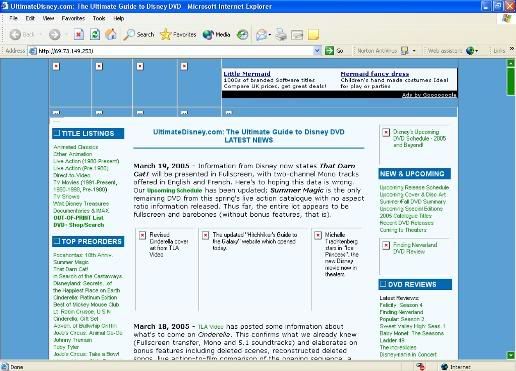
I have the same problem.
Posted: Sat Mar 19, 2005 6:14 am
That's exactly what I get in that picture, BonusMage.
I clicked on the IP address and I get the same problem as well.
I clicked on the IP address and I get the same problem as well.
Posted: Sat Mar 19, 2005 8:54 am
Are any or all of you guys running Norton Internet Security?
Posted: Sat Mar 19, 2005 9:19 am
On Thursday and Friday I was also unable to view any images on the forum and website. I asked a few friends to check it out to see if it was a wider problem but they could view everything fine. One friend did suggest it was due to anti-hotlinking, which Luke has confirmed. However, I can view images fine today...thank god 
Sam
Sam
Posted: Sat Mar 19, 2005 9:20 am
I have Norton Anti-Virus and I'm sure it runs. (don't think I have internet security. Heh, all my answers show how much I really know about computers)
But I have good news. No, I didn't save a bunch of money on my car insurance by switching to Geico, but I do see the pictures on the website now!! Luke, did you do something to any settings or something or did they just come back mysteriously?
But I have good news. No, I didn't save a bunch of money on my car insurance by switching to Geico, but I do see the pictures on the website now!!
Luke, did you do something to any settings or something or did they just come back mysteriously?Posted: Sat Mar 19, 2005 9:29 am
I just changed the hotlink settings to allow blank referrers. Apparently, not having that line in there gives problems for people with Norton Internet Security or other such things. Very glad to hear that did the trick for you two! Hopefully, no one is having problems now.
Sorry for the inconvenience!
Sorry for the inconvenience!
Re: Help!! Can't see pictures on this web site
Posted: Sat Mar 19, 2005 10:19 am
That happened to me last weekennd!! But it stopped 10 mins later without me even trying to fix itBonusMage wrote: Does the frontpage look like this?
I have the same problem.

I found it kinda weird....
But it hasn't happened to me ever since, so it's all good
Posted: Sat Mar 19, 2005 5:01 pm
Yes, I have Norton. I wondered if that was causing it.Luke wrote:I just changed the hotlink settings to allow blank referrers. Apparently, not having that line in there gives problems for people with Norton Internet Security or other such things. Very glad to hear that did the trick for you two!
Thanks
Posted: Sun Mar 20, 2005 12:59 am
Norton is overkill if you're running Windows XP SP2...
Try AVG... It's free, and you'll see a speed improvement on your computer as well. (free download)
I also suggest switching your internet browser to Firefox. (free download)
And get Microsoft's Antispyware if you don't have it already. (free download)
And if you're on Windows XP, upgrade to SP2. You have to get used to the new security settings, but it's def. worth it.
Try AVG... It's free, and you'll see a speed improvement on your computer as well. (free download)
I also suggest switching your internet browser to Firefox. (free download)
And get Microsoft's Antispyware if you don't have it already. (free download)
And if you're on Windows XP, upgrade to SP2. You have to get used to the new security settings, but it's def. worth it.
Posted: Sun Mar 20, 2005 1:14 am
Every thing is okay now for me too! Thanks!
Posted: Sun Mar 20, 2005 5:25 pm
or you just could get a mac

Posted: Sun Mar 20, 2005 11:47 pm
Amen! Macs don't have problems. Ever.deathie mouse wrote:or you just could get a mac
-Aaron
Posted: Mon Mar 21, 2005 11:24 am
Ew. Macs.awallaceunc wrote:Amen! Macs don't have problems. Ever.deathie mouse wrote:or you just could get a mac
-Aaron


Posted: Mon Mar 21, 2005 12:40 pm
Quiet you! Macs are wonderful. I'll admit I hated OS 9, but OS X (10) is wonderful!
Posted: Mon Apr 04, 2005 7:30 pm
I'm a HUGE fan of Firefox as well......
Trust me, it's worth the download 100%
Trust me, it's worth the download 100%
Posted: Mon Apr 04, 2005 11:56 pm
I agree 100%
Though my friend has a problem and keeps calling it FoxFire... go figure. LOL
Though my friend has a problem and keeps calling it FoxFire... go figure. LOL