Page 1 of 5
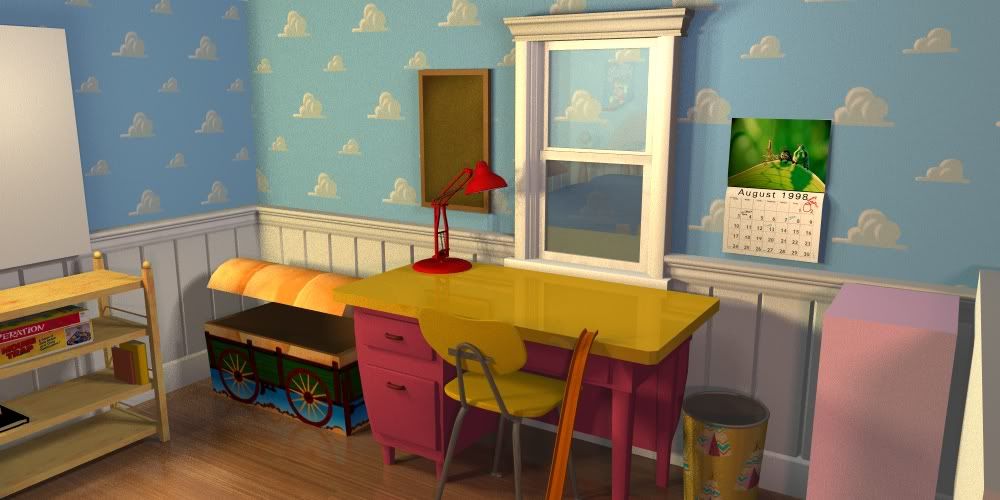
my recreation of Andy's room in 3d
Posted: Sat Sep 20, 2008 11:26 pm
by Kyle
This is still very much a work in progress, and I'll update you guys from time to time on my progress. a few things to note first: some things you see that are just cubes (windows, some of the furniture) are just placeholders until I get all the proportians of the room's measurements sorted out. and many other things such as the bed are either unfinished or temporary.
anyway, here are a few renders of what I have so far.


this is supposed to be the room from the first movie, and even though the calendar was only in the sequel, I put it in just for fun. I'll take it out later for accuracy's sake though.

Posted: Sun Sep 21, 2008 4:29 am
by slave2moonlight
Pretty neat! I have always wanted to recreate this room for real if I ever get my dreamhouse (which I want to have lots of themed bedrooms).
Posted: Sun Sep 21, 2008 8:02 am
by Kyle
heh, same here. it would be crazy hard and expensive though to get it as accurate as I'd want it to.
anyway, heres my luxo model. its the same model as the one in the luxo jr short. it'll be red later obviously, but I couldnt help but make it look like it does in the short first.

Posted: Sun Sep 21, 2008 4:09 pm
by Enchantress
That's really ace. I dabbled with maya this year and I just had a headache and got frustrated. How long did it take?
Posted: Sun Sep 21, 2008 4:49 pm
by Kyle
how long did what take? its kind of a broad question. overall Ive been at this specific project for about a month, but that's not non stop or anything. I just work on stuff here and there. for a few hours at a time.
now, if we're talking render times, some of these shots can take anywhere from 20 mins to 5 hours. the more reflections and shadows I have going on the longer it takes.
I don't use Maya or any other high end app though. I too found it too confusing for me. I use anim8or, which is a small freeware program you can download and anim8or.com. it only has a fraction of the features of the professional tools, but anim8or has come a long way in what it can do. it now has a long awaited ray tracer, so I can now do accurate reflections, and other types of distortions. its not optimised though so it takes forever to render.
but the program was pretty easy for me to learn. its great for learning the basics because its interface isn't as cluttered. though I really should try to move on to better programs. but alas, Im stuborn and afraid of change. sometimes learning a new app is like learning a new language.
Posted: Mon Sep 22, 2008 3:15 pm
by Luke
That looks really cool. Nice work!
Posted: Mon Sep 22, 2008 4:20 pm
by PixarFan2006
Nice work on both Andy's Room and Luxo, Kyle!
Posted: Mon Sep 22, 2008 4:26 pm
by drfsupercenter
Holy crap, that's amazing!
I don't know anything about image editing, other than the Paint basics... but that looks just like a DVD screencap! (No I'm not accusing you, I'm saying it looks that good LOL)
Posted: Tue Sep 23, 2008 2:44 pm
by Kyle
well, this isnt photo editing like photoshop like you might be thinking, its the same type of thing Pixar uses, with wireframes and whatnot. like this.

everything is made from scratch in 3d and can be viewed at any angle.
Posted: Wed Mar 04, 2009 8:19 pm
by Kyle
Posted: Wed Mar 04, 2009 8:30 pm
by ajmrowland
Sweet. BTW, the calendar uses a different image in the movie.
Posted: Wed Mar 04, 2009 8:35 pm
by ajmrowland
I downloaded the program. Any tutorials on how to use it?
Posted: Wed Mar 04, 2009 9:02 pm
by Kyle
yeah, I couldnt find the right picture, so I found one as close to it as I could that was high quality.
as for tutorials all I can say is check on the left of anim8or.com. the eggplant tutorial is a must for beginers. but I have over 7 years experience doing this and Im still learning, so dont expect to learn this too quickly.
Posted: Wed Mar 04, 2009 9:07 pm
by xxhplinkxx
Wow, that's awesome! Great work!
Posted: Thu Mar 05, 2009 6:34 pm
by Kyle
Started on Ham.

Posted: Thu Mar 05, 2009 9:37 pm
by ajmrowland
Wow! He looks just like he is in the movies! Can't wait to see the other toys! I've been stuck on that eggplant. The instructions aren't very clear.

Posted: Fri Mar 06, 2009 2:44 pm
by PixarFan2006
As I have said before, nice work, Kyle!
Posted: Tue Oct 13, 2009 4:12 pm
by Kyle
Molly's side of the room

And started on buzz.

Posted: Tue Oct 13, 2009 6:01 pm
by jpanimation
Will you be fully rigging your models?
I like what you've done and really envy your modeling skills. I can't model very well and can't light or render a scene worth crap. Where did you get your textures? Is there a place for Disney textures or did you have to re-create some of them on your own? Are you self taught?
Posted: Tue Oct 13, 2009 6:57 pm
by CampbellzSoup
I am HIGHLY impressed, very awesome work dude. You really have talent!