Page 2 of 5
Posted: Tue Oct 13, 2009 7:33 pm
by Kyle
jpanimation wrote:Will you be fully rigging your models?
I like what you've done and really envy your modeling skills. I can't model very well and can't light or render a scene worth crap. Where did you get your textures? Is there a place for Disney textures or did you have to re-create some of them on your own? Are you self taught?
Thanks. Where did I get the textures? Most of them I have re created from scratch in Photoshop, I dispise the idea of using anyone else's textures in my work. I did borrow the woody poster and toy chest textures though, and once I do the bed spread, posters etc I will probably borrow those as well. the borrowed textures Ive borrowed so far come from the ultimate toy box, so I just took screen caps of the textures I needed.
But! I do plan on scrapping everything Ive borrowed when the project is mostly complete and replacing them with my own, so I can feel like its 100% mine, aside from the basic concept ideas behind the design.
The hardest ones for me to recreate was the cloud texture and wood flooring. Because they had to be tilable, and the clouds in particular start out angled to keep it looking more random. the colors also often change from photoshop to final render, so Im constantly adjusting the colors in the original file.
I am self taught, but I get a lot of advice from other experienced modelers online.
Will I fully rig my characters? We'll see. Simply making them look film accurate will be a huge feat in itself for me, as I almost never complete my character models, I get too frustrated and give up. If and when I accomplish that, I'll look into rigging them for animation. I'm really not good at rigging though. I think Buzz might be the easiest to rig, my only concern is the rubber around the shoulders.
modeling wise Im dreading buzz's vest thing, there are some complex curves there that'll be hard for me to do without looking lumpy.
Posted: Sat Oct 31, 2009 3:54 pm
by Kyle
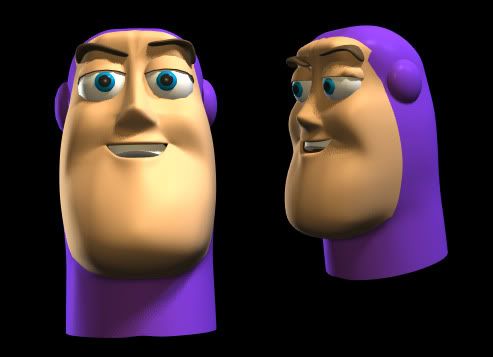
Working on Buzz's head.

Posted: Sat Oct 31, 2009 11:01 pm
by ajmrowland
Always nice to know that Buzz has a face!

Posted: Sun Nov 01, 2009 7:24 pm
by Kyle
Posted: Tue Nov 03, 2009 12:23 pm
by ajmrowland
That's really cool!

Posted: Tue Nov 03, 2009 3:17 pm
by yakkofan725
Wow, I am impressed
Posted: Tue Dec 22, 2009 12:01 am
by Kyle
Long time since Ive updated. still polishing up Buzz's head, finally fixed a problem with his mask, there was an obvious problem with the flow of the loops causing a jagged edge, so thats gone now.

Think Im burning out on Buzz here, I might take a break from him and move on to starting Woody's head next.
Posted: Tue Dec 22, 2009 2:18 pm
by Margos
What do you call Buzz when you drop him in a pool?
Bob.
What do you call Buzz when you hang him on your wall?
Art.
What do you call Buzz when you put him in a hole?
Doug.
What do you call Buzz when you put him in front of your door?
Matt.
Posted: Tue Dec 22, 2009 3:20 pm
by Kyle
Posted: Tue Dec 22, 2009 7:56 pm
by Margos
It's those horrible jokes about people lacking arms and legs. I don't think they're all that great, but it just seemed fitting....
Posted: Wed Dec 23, 2009 8:34 pm
by Maerj
ajmrowland wrote:Wow! He looks just like he is in the movies! Can't wait to see the other toys! I've been stuck on that eggplant. The instructions aren't very clear.

I thought that they weren't very clear either. I tried some other tutorials there that were much clearer. There is one for building a chair and that one worked out very well for me.
Kyle, *very* nice work. Seriously looks just like the real thing. Think about all the money, time and technology Pixar uses and you did the same thing on your own computer by yourself.
Posted: Sun Jan 24, 2010 6:54 pm
by Kyle
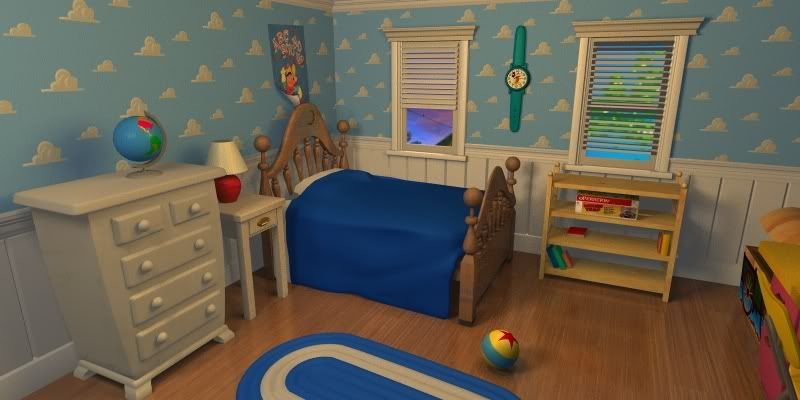
Windows? yes please.

Now I'll need to do new matte paintings, for now its just the one I already did, rotated a bit for variety. Didn't realize the one window background wasn't lined up properly until after the render.
Theres also new more accurate trim (for the siding that goes half way up the wall)
Heres a Bigger render, new painting in one of the windows, lowered the blinds too.
Heres a video documenting the whole Toy story project.
<object width="560" height="340"><param name="movie" value="
http://www.youtube.com/v/Ufvh5pH05h0&hl ... ram><param name="allowFullScreen" value="true"></param><param name="allowscriptaccess" value="always"></param><embed src="
http://www.youtube.com/v/Ufvh5pH05h0&hl=en_US&fs=1&" type="application/x-shockwave-flash" allowscriptaccess="always" allowfullscreen="true" width="560" height="340"></embed></object>
Along with most of the renders Ive already posted, you'll also get some basic animation. It would take ages to render so its all in real time.
I have a feeling the audio might get removed, as its already been flagged, and made not available in some countries, so I might end up taking it down and re uploading it with royalty free music, or at least someone lesser known. I hate that crap...there are entire videos up for nothing other than to let people listen to the same tracks Im using here, and those have been up for over a year. why not pick on them? Im not even playing entire tracks.
Posted: Sun Jan 24, 2010 7:18 pm
by Sky Syndrome
Great job, you obsessive compulsive person you!
But really, that's an incredible replica!

Thank you for keeping us up-to-date about it.
Posted: Mon Jan 25, 2010 3:10 pm
by Margos
That looks amazing, Kyle!
How dare Lego steal that from you!?
But hey, is that Randy Newman song in the beginning the one from the Toy Story 3 trailer? Do you think it's going to be in Toy Story 3? Because I'd never heard it before except on the trailer, and I think it would be a very emotional song about the toys losing Andy....
Posted: Mon Jan 25, 2010 4:42 pm
by Kyle
Id be very surprised if that the trailer song makes it into the movie, because it came out on Randy's 08 album, harps and angels. when has Pixar ever used a previously released song? the only one that comes to mind is Hello Dolly in Wall-e. I think they just thought it would work for the trailer, and slapped it on there. the sound track is still being worked on as we speak, so I just don't think they had enough to use at that point.
I'd also be surprised if we hear Randy sing at all. He hasn't sung in a Pixar movie since...well the first toy story I think. sure, he got the credits of a bugs life, but I'm talking in movie.
Posted: Mon Jan 25, 2010 5:15 pm
by Margos
Oh, well I don't follow Randy Newman, so I wasn't aware that the song had been previously released. And no, he doesn't sing much (thank goodness!), but hopefully Toy Story 3 will have at least one good song in it. I mean, Pixar movies are never really musicals, but the Toy Story series has always been sort of the exception with stuff like "You've Got a Friend in Me," "I Will Go Sailing No More," and of course, "Whe She Loved Me." Oh, and "Woody's Round-up!"
Posted: Mon Jan 25, 2010 6:54 pm
by ajmrowland
Oh, man, that is so awwesome!
So, you're using Anim8tor? How does that program work for you? I'm working with a free one called Blender, so I can't tell.
Posted: Mon Jan 25, 2010 8:34 pm
by Kyle
Blender is more powerful/advanced than Anim8or (which is free as well), but its all Ive ever known. I don't care for the workflow of other programs that Ive tried. But Ive heard the same thing from people who learned blender (or other apps) first too. Anim8or does have a lot of limitations, heck it only just recently got a ray tracer in its renderer about a 2 years ago. Things like reflection and refraction are still like new toys for me.
The ray tracer, still in beta, has some annoying flaws, such as not allowing light to pass through transparent objects, and every light and object must cast and recieve shadows, its little things like that that get annoying, but I manage to deal with it. And you have to consider Anim8or is all done by one guy, which is quite a feat.
its renderer is painfully slow, it really wasn't meant for animation, despite its name. Its better for modeling.
Anim8ors simplicity both helps and hurts it. On one hand it makes it easier to noobs to grasp, but after a while most people want to move on. if I had the patience I would have done so by now, but I'm impatient with learning curves that come with learning new interfaces and what not.
I feel like I know this program inside and out (with the exception of some recently added features I still dont quite get) since I first downloaded it back in 2001.
Posted: Tue Jan 26, 2010 11:47 am
by ajmrowland
So Anim8or is simpler than Blender? I think i know where to start. thx!
Posted: Tue Jan 26, 2010 11:50 am
by blackcauldron85
That's so impressive, Kyle- amazing work!