Page 10 of 71
Beauty and the Beast Next Release
Posted: Tue Sep 22, 2009 9:16 am
by Disney Duster
Actually
Kubrick there's so many things I want to do I have not had time, but I was going to talk about what I caught they changed in Sleeping Beauty in it's thread.
I forget some of them, but the biggest one was that in a part where Flora turned the dress pink, instead of the pink color spreading over the dress like painted, in the original version in all previous releases, the restoration had the dress fade from blue to pink, so it would be purple in some frames, etc. They thought the animators made a mistake. This is why they should never "correct mistakes" because they can not know what they wish they would have done, just what it originally looked like.
I will post screencaps later sometime in the Sleeping Beauty Platinum thread when I have time.
Marky, those alterations to the music are only in the remix of the soundtrack. The original, un-altered soundtrack is still on the DVD, you just have to look for it in the options.
However, you're Merryweather frame always brings up a good point.
I will look more at such things later, but has anyone noticed in the restored frame, it really looks like they digitally re-painted the image, because of the way the lines look so sharply...pixelated. Unfortunately I cannot explain it well, but it is more than just the fact it is in a computer that makes an image of pixels, because as we know the previous 2002 DVD restoration was also in a computer, it's image made of pixels. Just please look at this for me to try and see what I mean:

That is not something they could have done back in the day the film was made.
Posted: Tue Sep 22, 2009 10:58 am
by yukitora
funny that my bd copy looks NOTHING like that screenshot

Posted: Tue Sep 22, 2009 11:15 am
by jpanimation
Actually yukitora, it probably does look that way. The thing is we're sitting inches away from the full blown 1080p image on our computer monitors (mines about 24"). I don't know about you but I sit between 10-15 feet away from my 52" TV so I'm never that close to the image but maybe eveyone here sits right in front of their TVs. Either way, seeing it in motion and from that distance I didn't notice it at all.
Posted: Tue Sep 22, 2009 10:56 pm
by goofystitch
Is it just the one frame that looks like that? Or are there multiples in the same scene?
Posted: Wed Sep 23, 2009 1:00 am
by KubrickFan
goofystitch wrote:Is it just the one frame that looks like that? Or are there multiples in the same scene?
Just one shot, as far as I'm aware.
Posted: Wed Sep 23, 2009 3:27 am
by yukitora
jpanimation wrote:Actually yukitora, it probably does look that way. The thing is we're sitting inches away from the full blown 1080p image on our computer monitors (mines about 24"). I don't know about you but I sit between 10-15 feet away from my 52" TV so I'm never that close to the image but maybe eveyone here sits right in front of their TVs. Either way, seeing it in motion and from that distance I didn't notice it at all.
Uhm, no, it doesn't.
Maybe they're something wrong (right) with my copy

Posted: Wed Sep 23, 2009 3:41 am
by Jules
Scaps wrote: 
for singerguy!
Tee-hee!
I liked
singerguy's Crayola bit!
Mike wrote:I will look more at such things later, but has anyone noticed in the restored frame, it really looks like they digitally re-painted the image, because of the way the lines look so sharply...pixelated.
Duster, the cap
Marky always provides has always struck me as strange too. And I suspect it is not a true screencap of the Blu-ray, but a digitally manipulated one.
I don't see the professionals at Lowry (whose work I love) leaving a frame looking so obviosuly processed. These guys know their stuff, and they love movies. They treat them well.
Posted: Wed Sep 23, 2009 4:21 am
by Marky_198
goofystitch wrote:Is it just the one frame that looks like that? Or are there multiples in the same scene?
It's not one frame, the whole scene is like that.
Posted: Wed Sep 23, 2009 4:30 am
by Marky_198
Julian Carter wrote:
Duster, the cap Marky always provides has always struck me as strange too. And I suspect it is not a true screencap of the Blu-ray, but a digitally manipulated one.
I don't see the professionals at Lowry (whose work I love) leaving a frame looking so obviosuly processed. These guys know their stuff, and they love movies. They treat them well.
That's what I thought too, but I've seen a couple of SB Blu-rays on different tv's and it definitely looks like this.
I hope this is a wake up call for some people.
Obviously there is A LOT more processing going on than just "going back to the negatives".
They are digitally recoloring the shots, lines and patches.
And detail disappears (like the sleeve).
I think it has to do with the fact they scan the frames into a cleaning up programm, that is so strong, that it not only removes all the dirt, but every other detail too. And it fades the lines too. So therefore they have to digitally repaint the lines and patches.
And that is what breaks the classics.
That is when this look is created.
I was shocked when I saw the versions of SB on Blu Ray (and dvd).
It's just so obvious what they've done.
I'm glad people start to wake up now, as they don't even seem to believe it's real.
Posted: Wed Sep 23, 2009 4:43 am
by Jules
Marky wrote:I think it has to do with the fact they scan the frames into a cleaning up programm, that is so strong, that it not only removes all the dirt, but every other detail too. And it fades the lines too. So therefore they have to digitally repaint the lines and patches.
What's strange is that the effect you're talking about happens often when DVNR (Digital Video Noise Reduction) is used. Basically, DVNR is a cheap and automated way of cleaning up film. When the program sees an imperfection, it hides it using surrounding colour information.
If used responsibly it can generate pleasing results. However, if used amateurishly it can yield just the opposite. Details and line art become smudged. I've never personally seen them, but some Looney Tunes Golden Collection sets reportedly look terrible because of this.
Now, Disney pays Lowry handsome sums of money to restore their films, so I'd be scandalised if Lowry resorted to something like DVNR in their work. I really doubt that happens - firstly I've never encountered any criticism of Lowry using DVNR, and Lowry pride themselves on restoring each frame by hand (and not letting a computer do all the work) ...
Take a look at these screenshots from Blu-ray.com. They look beautiful, and don't show any of the pixelisation and smudging on that Merryweather pic.
http://www.blu-ray.com/movies/Sleeping- ... shots/555/
Posted: Wed Sep 23, 2009 4:50 am
by Scamander
@Marky: That is so not true. Yesterday I was standing right in front of my Full-HDTV just to watch this scene and it does NOT look like that. In fact I didn't realised any difference between this scene and the rest of the film.
And which details have been gone? Just look at the backgrounds which are full of detail and totally sharp. They wouldn't if they had used automatic tools.
Posted: Wed Sep 23, 2009 7:35 am
by Marky_198
Julian Carter wrote:
What's strange is that the effect you're talking about happens often when DVNR (Digital Video Noise Reduction) is used. Basically, DVNR is a cheap and automated way of cleaning up film. When the program sees an imperfection, it hides it using surrounding colour information.
Yes, they might have another reason for doing this, but it's clear that they repainted patches and lines.
If someone has a Blu-ray screencap of this shot where the image isn't digitally repainted, or the pink patch on her face, or the lines in her face, and where the sleeve actually
still has 2 colors, be my guest and post it.
The scenes that do look good in the restoration, are the scenes where the characters are less closeup.
My biggest problem is that this makes the classics look very flat and childish. Like a sequel.
The class, depth and feeling is gone.
I can see why those new thick lines and digitally painted patches look "perfect" to some people, but to me it looks digitally repainted, flat, and far from perfect. It doesn't benefit the film at all.
I also understand that with the hd formats, they probably need to do this, to make the characters look more "solid" or anything. I don't know, but I hardly recognize the maturity and beauty that made me love the classics so much.
But to stay on topic. I watched my BATB dvd yesterday.
That one has a similar problem. How on earth did they manage to suck so much life out of it?
While the theatrical version and the laserdisc version are absolutely stunning, mature, full of life, the dvd is nothing more than a sequel.
I wouldn't even stay tuned if I would see this kind of quality passing by on a tv channel.
Disney needs to realize what makes or breaks a classic.
Because the general impression people have of the film and the overall popularity will change. These 2 generations still based their opinion on the OTV, but the next generations will base their opinion on the dvd, Blu-ray.
All my little cousins seem to have little interest in the BATB dvd.
Which I find astonishing, because when it first came out, everyone was in awe. But considering what the film looks like on the dvd, I really understand them.
Posted: Wed Sep 23, 2009 10:36 am
by goofystitch
Marky_198 wrote:goofystitch wrote:Is it just the one frame that looks like that? Or are there multiples in the same scene?
It's not one frame, the whole scene is like that.
As an owner of the Blu-Ray, no, the whole scene is not like that. You really do cling to what ever "evidence" you think you can find to support your incorrect claims that DVD provides better picture quality than Blu-Ray. By this point, Marky, you have become that weird poster that everybody either ignores or loves to argue with. So congratulations on being "that guy."
My guess is that this screencap was taken as the user's program was having a glitch, causing a distortion in the image. I watched this scene in slow motion and did not see the distorted lines.
Posted: Wed Sep 23, 2009 10:37 am
by ajmrowland
DVNR isn't even reserved just for old films. The Golden Compass' DVD/blu-ray are so heavily DNR'd, the actors look like plastic. That's something that's harder to say for Sleeping Beauty.
Posted: Wed Sep 23, 2009 10:40 am
by CampbellzSoup
The Blu Ray of Sleeping Beauty looks amazing, and for your still shot on a 3rd party site (which isn't even your own of the film) doesn't lend you any credibility at all.
I don't understand what you're trying to prove anymore? If you want to watch your VCR and Laserdiscs then by all means do so, but what are you trying to achieve by constantly bickering/taking apart a film screenshot by screenshot trying to prove?
Posted: Wed Sep 23, 2009 10:48 am
by ajmrowland
^Actually, last I checked, he only used the same screenshot without uploading it himself, and thusly, has really no existent proof that he found without attempting to google "Sleeping Beauty, New Restoration, artificially painted 'mistakes'".
Beauty and the Beast Next Release
Posted: Wed Sep 23, 2009 11:08 am
by Disney Duster
Well...I don't want to make this a Sleeping Beauty thread, but I do want to talk about what's important and what is being discussed right now, so...
I just want to show a different frame from the same scene showing the same problem, because it is in more than one frame:
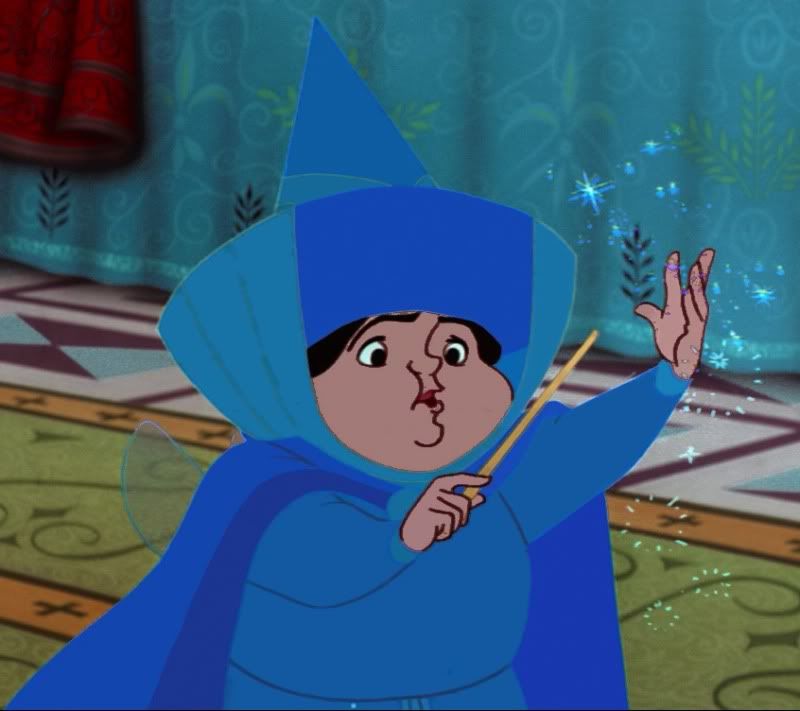
When I played my DVD, I could not find a button to zoom into the image. I believe I got the cap from someone who had the Blu-ray, and maybe the Blu-ray makes it that big, or maybe their computer screen is so big they didn't have to zoom in, I don't know.
Yes, you can't really see the look of it possibly being digitally painted from far away, or on the DVD.
EDIT: My Photobucket account seems to make the pictures kind of blurry, or maybe that happened when I made it a jpeg to upload it! Well...that this is what I have anyway, but trust me, before it got blurry, you could still see the square pixelated lines...
Posted: Wed Sep 23, 2009 11:56 am
by Jules
Yes,
Mike, but what proof do you have that whoever gave you that pic didn't tamper with it beforehand?!
I refuse to believe that that is an unchanged cap from the Blu-ray disc.
And I'm so convinced of this that I say it at the risk of being proved wrong and having to (humiliatingly) eat my words.

Posted: Wed Sep 23, 2009 12:16 pm
by goofystitch
You know what the jagged lines sort of look like? Like somebody painted lines on a cell that weren't meant to be there and somebody scraped them off with a tooth pick.
When I was younger, I took an animation class at the Disney Institute in Disney World and we got to paint a cell. When you made a mistake, you would wait for the paint to dry and then scratch the paint off with a tooth pick. Perhaps this wasn't visible in standard definition before the new restoration, but does that make it wrong? After all, the jagged lines are bordering areas where there shouldn't be a sharp black line.
Posted: Wed Sep 23, 2009 12:19 pm
by yukitora
Here's something interesting;
Although it does not appear on my BD copy, I downloaded a BDrip of the film on the net and that screenshot does appear to be untampered. However it is only that single scene. Taking that into considering, marky's argument is still incredibly weak. It's just one seen, and only noticeable when seen on a computer (which it isn't intended for)
actually whats more interesting is what goofystitch said above.